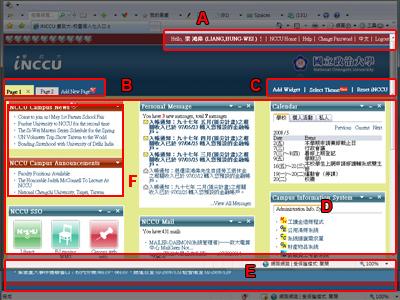
‧Once I login, what functions are available to me?
Section (A):
This section contains several information:
‧User name (English name or English nickname);
‧Home;
‧Illustration, How to Use;
‧Change Password;
‧Language Option, select the language you are familiar with (currently providing Traditional Chinese and English);
‧Logout, Logout inccu;
Section (B):
User can add new pages and change the names of the pages.
Section (C):
‧Add Widget: User can select widgets that are frequently used;
‧Theme: User can change background themes accordingly;
‧Reset iNCCU: Reset to predefined interface configurations.
Section (D):
This section is the customized contents shown in the various pages in Section (B), widgets chosen in Section (C) “Add Widget” will be displayed here, and each widget can be moved, edited or closed by the user.
Section (E):
This section displays contact information
Section (F):
This section displays fixed widget categories so you can keep in time with the latest campus announcements.